

Preparing the Sensor for Use
The MTS160 is ready for operation with only minimal configuration.
Zero-Level Calibration
Zero-level calibration must be performed after installation and before normal operation. Ambient magnetic offset depends on the installation environment and can be affected by nearby steel structures, wiring, motors, or other magnetic sources. For accurate operation, position the robot away from the track and other magnetic sources, then issue the zeroing command through CAN, serial communication, or the Naviq utility.
If the unit has not been zero-calibrated, the arrow LED remains purple continuously. After successful calibration, the LED returns to its normal indication behavior.
Important Notice
Calibration is lost when Restoring Factory Defaults with the Naviq utility.
Tape Polarity Selection
By default, the sensor is configured for tracking tape with North polarity on the top surface and markers with South polarity on the top surface. This setting can be reversed if the installed tape uses the opposite polarity.
To identify tape polarity, suspend a piece of tape from a 50–100 cm thread and allow it to align with the Earth's magnetic field. Alternatively, place a compass against the top, non-adhesive side of the tape. The north end of the compass needle will be attracted to the tape's south pole, and the south end will be attracted to the tape's north pole.
Tape polarity can be configured through serial communication, CAN communication, or the Naviq utility.
Track and Markers Threshold
The MTS160 detects tracks and markers by measuring changes in magnetic field strength. Tracks are detected where the field increases, while markers are detected where the field decreases.
The tape pulse threshold is defined as a percentage of the detected tape peak and is used to determine the tape edges.
The marker threshold is defined as an absolute magnetic field value in microtesla.
The tape strength thresholds define when reported tape strength changes from weak to medium to strong. These thresholds control the TDet field reported by serial ?SALL and the CAN TPDO status byte.
Automatic tape-width detection is enabled by default. When it is disabled, the configured magnetic tape width is used by the tracking algorithm.
These settings are factory-set for normal operating conditions and usually do not need adjustment.
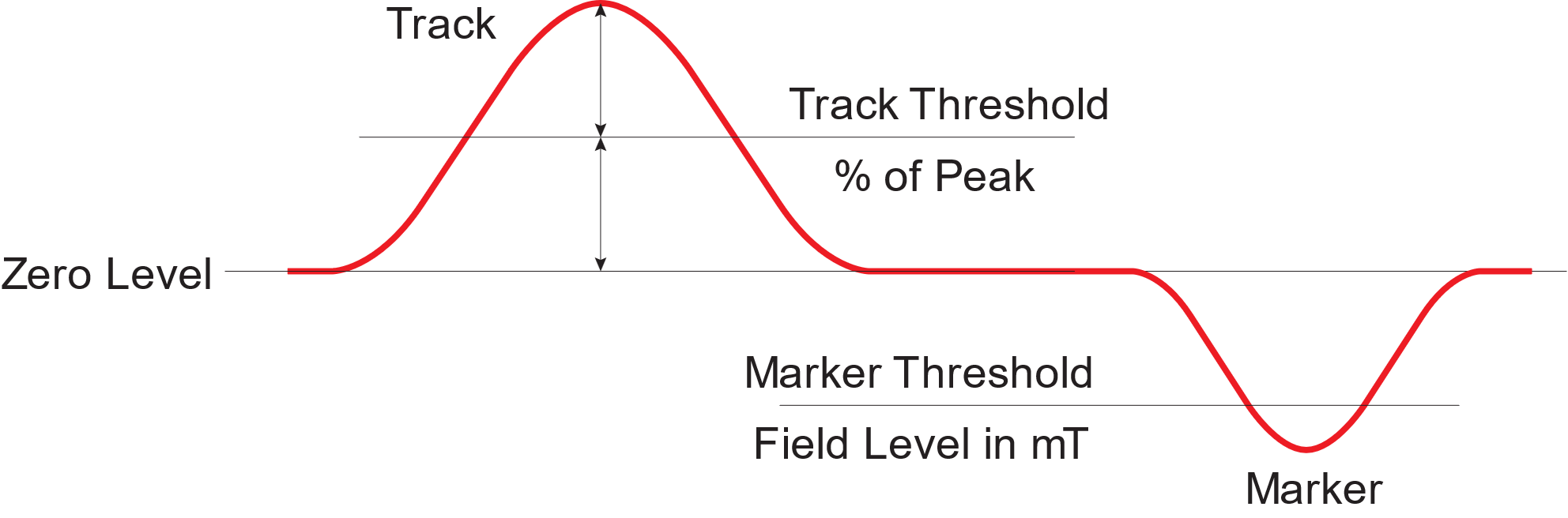
In installations with magnetic disturbance, such as magnetized steel in the floor, threshold adjustment may improve detection reliability. Before changing these values, review the field and detection graphs in the Naviq utility to understand the disturbance and verify that threshold adjustment is appropriate. Thresholds can then be adjusted through the Naviq utility or via CAN bus.
TIP
Factory defaults are optimized for most applications. Adjust thresholds only when necessary.
Communication Mode Selection
The MTS160 can be configured to operate in the following modes:
- RS232 — Factory Default
- CANopen
When configuring the sensor with serial commands, most configuration changes take effect immediately but are not stored permanently until !SAVE is sent. CANopen SDO configuration writes use the same active-runtime behavior, so save the configuration through the Naviq utility or serial !SAVE if the settings should survive a power cycle. Zero-level calibration and factory reset are saved automatically.
RS232 Configuration
RS232 is the factory-default communication mode. It operates in full-duplex mode with 8 data bits, no parity, one stop bit, and no flow control. The sensor does not echo received commands.
Selectable bit rates are:
- 9600 bps
- 19200 bps
- 38400 bps
- 57600 bps
- 115200 bps — Factory default
The RS232 configuration command contains an Inverted field for compatibility, but current firmware uses standard non-inverted RS232 signaling. Leave this field set to 0.
Use the USB port together with the Naviq utility to change RS232 settings. When changing RS232 settings with serial commands, send !SAVE after verifying the new settings if they should remain after power cycling.
CAN Bus Configuration
Use the USB port together with the Naviq utility to configure CANopen settings.
Selectable CAN bit rates are:
- 125 kbps
- 250 kbps (default)
- 500 kbps
- 1 Mbps
The CAN node ID is user-selectable from 1 to 127. The factory default node ID is 1.
PDO Send Interval: In CAN mode, the sensor can transmit measurement data in three TPDOs at user-configurable intervals. A TPDO is transmitted when it is enabled and its period is nonzero. TPDOs are disabled by default and their default stored periods are 10 ms. Measurement data is generated every 5 ms, so periods below 5 ms can repeat the same sample.
Heartbeat Interval: The sensor also supports the standard CANopen heartbeat mechanism. The heartbeat interval accepts values from 0 to 65535 ms and defaults to 1000 ms. A value of 0 disables heartbeat transmission. For any nonzero setting below 100 ms, the firmware uses a 100 ms heartbeat interval.
Termination Resistor: The sensor includes a built-in, software-selectable 120-ohm CAN termination resistor. It is disabled by default. Enable it only when the sensor is installed at one end of the CAN bus and termination is required.
Auto Run: When Auto Run is enabled, the sensor enters CANopen operational state at power-up and begins transmitting enabled TPDOs. When Auto Run is disabled, the sensor starts in pre-operational state and waits for network control before transmitting TPDOs. Heartbeat messages are still transmitted in pre-operational state if the heartbeat interval is nonzero.
WARNING
It is recommended to configure CAN settings before connecting the sensor to an active network in order to avoid bitrate or node-ID conflicts.